With the wonderful new masking tools in Lightroom Classic V 11 we can easily Select the Sky and make adjustments. Select luminosity or Color and make further adjustments and we can add and subtract from those masks to refine them further.
I first go to the new masking tool and SELECT SKY and TADA, it creates a mask. Sometimes its not perfect so I need to ADD or SUBTRACT from the mask to further refine it. No Problem
SELECT SKY
SUBTRACT with brush (BLACK ) to clean up mountain top
ADD with Brush (white) to clean up Sky
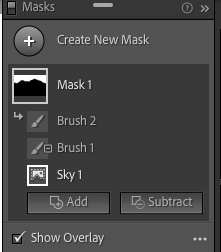
MASK 1 PANEL
After I make adjustments to the sky wouldn’t it be great to simply DUPLICATE the whole thing and INVERT it to select everything but the sky for further adjustments. If you’ve been playing around with this you have found that that doesnt do what you want it to do!!!!
DUPLCATED MASK INVERTED!
Heres a workaround Ive found and it seems to do just what I want with a few extra steps.
Step One – DUPLICATE THE MASK
2. On the very bottom layer of the new mask click the 3 dots and choose INVERT
SKY LAYER – INVERT
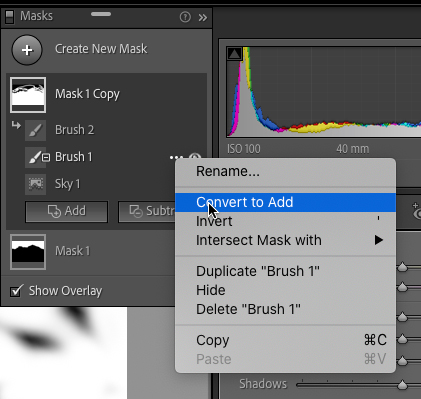
3. On the next level up click the 3 dots and select CONVERT ( it will either say Add or Subtract depending on what you did before) If you added on the first mask it will say subtract etc
BRUSH LAYER – CONVERT to ADD
4. Do this on the remaining “layers” and TADA an inverted mask with all the adjustment!
A fully adjusted mask INVERTED
Seems like a lot but it really goes fast. Im sure the engineers at Adobe are working on this and it will be much easier after an update but for now this works great!
Suzanne is a professional freelance photographer whose work regularly appears in Arizona Highways Magazine, as well as numerous national publications such as National Geographic,Outdoor Photographer, Digital Photographer and calendars for the Nature Conservancy, Smith Southwestern and The Global Action Team.
Suzanne is a photographer, speaker, author and educator. Teaching Lightroom and Photoshop in private and group settings.
Suzanne was born and raised amidst the green rolling hills of the English countryside but is now completely at home surrounded by the arid desert and swirling sandstone of the Southwest. She finds Arizona a land of intense beauty and preposterous contradiction. Her photographs capture the diversity of waterfalls, snow-capped mountains, autumn leaves and desert sands, from the magnitude of the immense landscape to the smallest, most discreet of details.
The desert can be unforgiving of even the smallest errors, treating the unprepared harshly. But, for the few with passion, those who are willing to begin their trek at the end of the road, the secret world of the Southwest is revealed. Suzanne loves to challenge the ruggedness of the land, the great distances to be traveled, and intense weather conditions to capture images of Arizona and the Southwest that expose its many treasures and extremes.
Her images reflect her keen sense of curiosity, patience and the ability to see the world and its magic places in new and creative ways.







 suzannemathia.blog
Leave a reply to Kris Cancel reply